TRADESMAN Deal to Dealer Controls, HUD, and Save Files
Keyboard and mouse first. Sleep to save. The bottom-right icons are the real hotkeys.
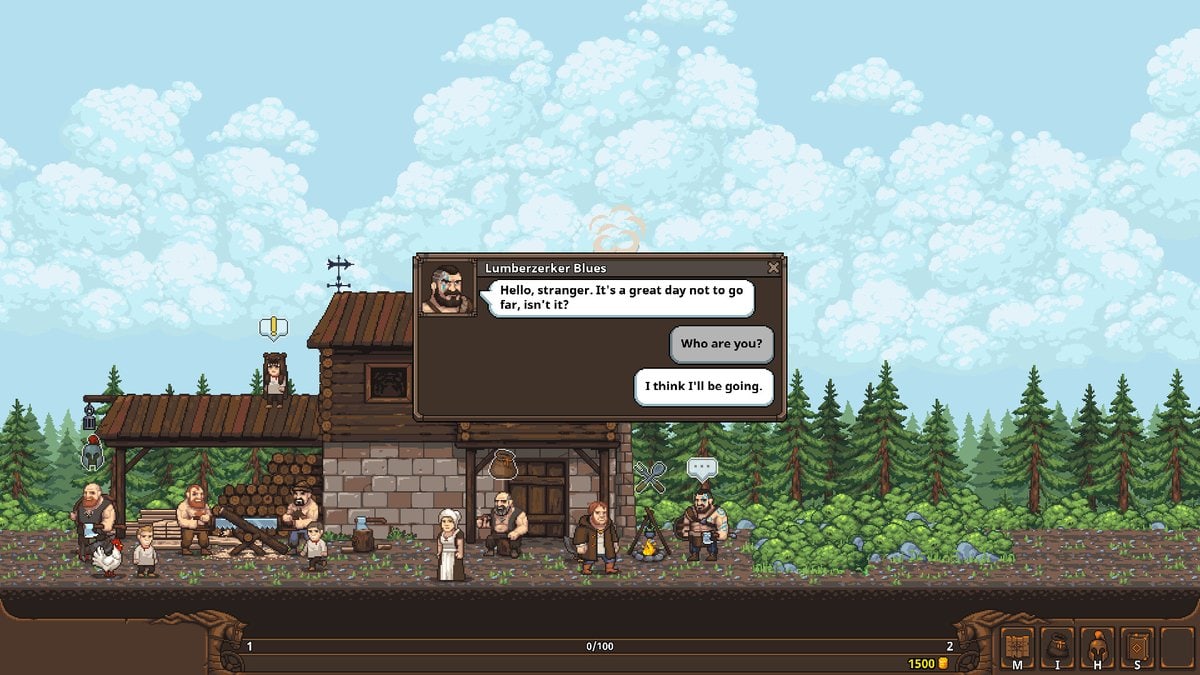
AZAMATIKA’s own prompt says it with a smirk: use a keyboard and mouse for confident, comfortable gaming. Gamepad is allowed; the UI still thinks in clicks. This sheet is the 1.0 control and save reference so you stop alt-tabbing to a forum thread from 2024.
HUD cluster (English screenshots)
Bottom-right four icons, left to right in current builds:
- M — map. Roads show danger pips. Lower number, kinder enemies. Open this before you leave town, not after the wolf.
- I — inventory / trade context depending on where you stand.
- H — hire / party / mercenary panel.
- S — skills / talents. Some older community guides call talents L; if your language pack remaps a letter, trust the icon art.
Bottom-left numbered wells are cargo. Center-right is coins. Quest book is its own panel; 1.0 added bumper/arrow switching between tabs and individual jobs.
Movement is a side-scroller. You drive the cart along the lane, enter towns as scenes, and click NPCs, stalls, and your wagon (three tabs, second tab is chassis — carts). Combat is click-to-cast on active skills while the auto-battler plays. There is a Quick Battle button for solved fights.
Saving, Cloud, and the scary folder
The game autosaves when you sleep at camp. Set a watch or you wake up robbed. Manual “save now” is not the culture; rest is.
Windows folder:
%USERPROFILE%\AppData\Local\Tradesman\
Expect save.ini and .dat files. Steam Cloud is on. Copy the folder before any patch that admits it will rewrite saves — several Early Access drops did. If a migration fails, the studio has historically asked for a new game. That is why Getting Started tells you to rest often.
Workshop localisation: the official guide uses a four-key hold (B, A, M, F) then F2 to register a lang_* folder. That is a modding trick, not a combat bind. Details and Discord sit on links.
Keyboard versus Deck
Steam Deck compatibility is Playable. Text is readable, default controller config works, some prompts still show mouse/keyboard icons, performance is acceptable on default graphics. If a prompt says click the stall, use the trackpad. Do not expect a dual-stick action game; this is a cart sim with an auto-battler.
Minimum PC: 64-bit Windows 10, Intel 4th-gen dual-core 2.0 GHz, 4 GB RAM, GTX 9-series class, 500 MB disk. Recommended: 7th-gen CPU, GTX 10-series class. Engine is GameMaker. A demo exists on the Steam page if you want to test binds before paying.
Quality-of-life binds people miss
- Click your cart in town to swap chassis and check overnight bonuses.
- Hover every ware for danger traits before you confirm — trading.
- Quest book arrows after 1.0.
- Language: Main menu → Settings → Language. Official set is English, Russian, Simplified Chinese, Vietnamese, Spanish (Spain). Workshop can add more.
If a skill will not fire, you are in the overworld, not in a fight. If the map will not open, you are in a stall UI; close Trade/Inventory first. If the game “did not save,” you did not sleep.
Patch notes that add buttons land on updates. Until a future Wasteland UI pass, this cluster is the whole language of the cart. Pair it with combat so M and S are reflexes, not archaeology.
Frequently Asked Questions
Quick answers to the most common merchant questions.
How do I save?
Sleep at camp with a watch. Files live in AppData\Local\Tradesman and on Steam Cloud.
What do M I H S mean?
Map, inventory, hire/party, skills. Older guides mention L for talents — follow the icon if letters differ.
Does it work on Steam Deck?
Playable. Some mouse icons remain. Use the trackpad in stalls.
Can I play with two controllers?
No. Single-player only.